Delivery delays
In most cases a message arrives in seconds. When it takes longer, the delay is usually outside Sooma: on the sender's server, which only retries every so often after a temporary failure, or on the recipient's server, which accepts the message but delivers it later.
See a message's journey
The Delivery Logs show what happened to each message sent or received by your mailbox.
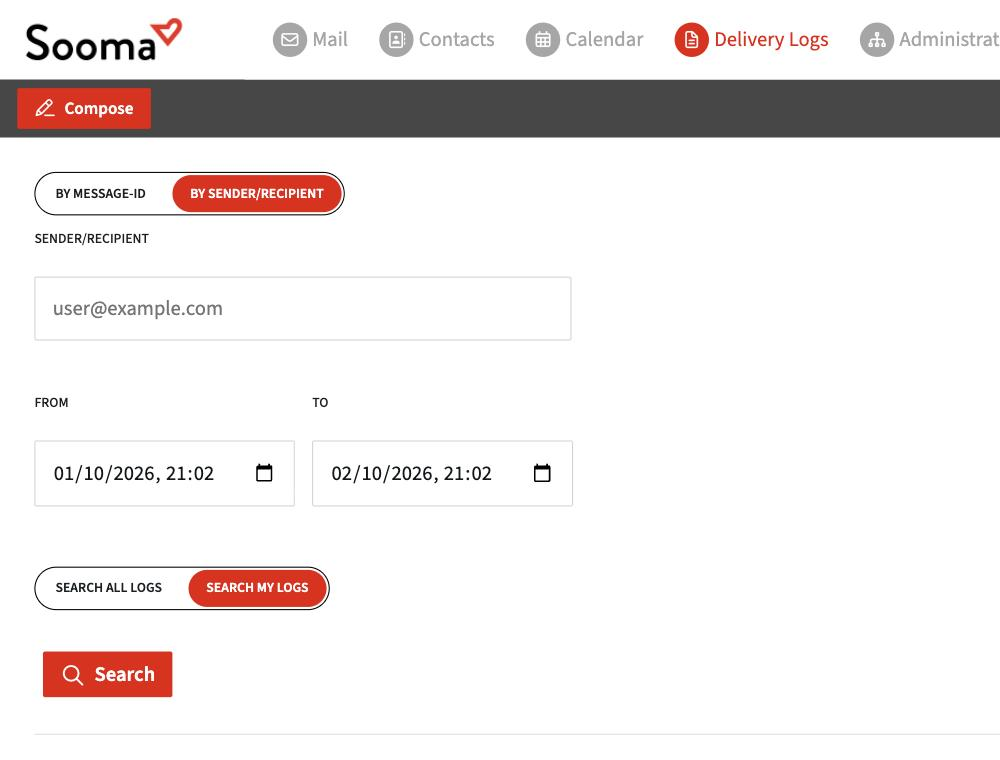
- In webmail, open Delivery Logs (in the top bar or under Preferences).
- Choose how to search:
- By sender/recipient — type the address on the other side and the period (From and To).
- By Message-ID — the message's unique identifier, found in its source.
- Keep Search my logs selected and click Search.
Shortcut: open the message and choose ⋮ > Trace message. The logs open with the Message-ID already filled in.
Domain administrators can choose Search all logs, to see messages from any mailbox in the domain.
How to read the result
- Message sent and accepted by the destination: on Sooma's side it is done. If the recipient cannot see it, the delay or block is on their side (spam, filters, quarantine).
- Deferred (temporary failure): the receiving server asked to try later. The platform retries automatically for several days before giving up.
- Rejected: the reason is given. See Bounced message.
Delays in one app only
If the message is already in webmail but does not yet appear in Outlook or on your phone, the app has not synced yet. See Outlook — receiving delays.